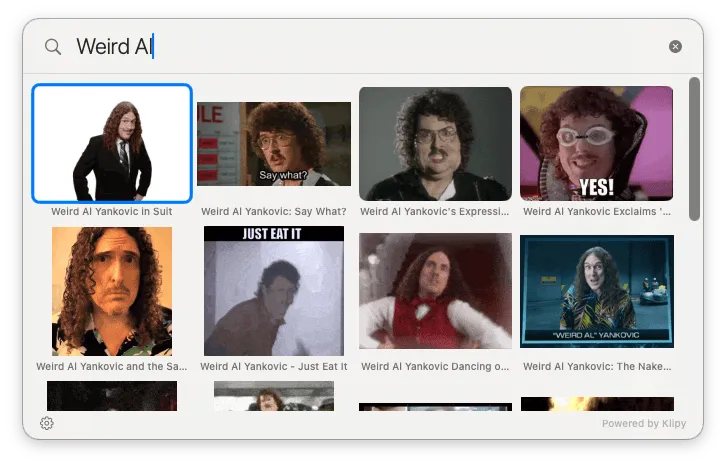
Hit the hotkey, type the query, arrow through results, hit return — the GIF is on your clipboard.
A tiny Mac menu-bar app for searching and pasting animated GIFs without leaving the keyboard. By Lex Friedman (Macworld, Six Colors); $7 one-time, with a memorable freemium gimmick.
Animated GIFs are a pillar of modern conversation, but getting one into a Slack message or an iMessage thread typically takes opening a browser, navigating to a GIF site, searching, right-clicking, copying, switching back, and pasting — by which point the moment has passed. Gnome collapses that to: hotkey, type your query (“shrug,” “nailed it,” “that’s a paddlin’”), arrow-key through results, hit return. The GIF is on your clipboard, ready to paste.
The unsung feature is the local GIF library handler. Point Gnome at the folder where you’ve been hoarding GIFs for years; it indexes them, lets you tag them, and — using Apple’s built-in vision frameworks — analyzes the frames for text inside the GIF itself. Type “don’t call me Shirley” and the Airplane! GIF surfaces no matter what you named the file. That’s the kind of detail you don’t get from Giphy-in-a-browser.
$7 one-time unlocks everything. There’s a freemium twist: after five unpaid minutes Gnome will only ever return Weird Al Yankovic or Rick Astley GIFs. Depending on your perspective, either a steep penalty or a generous gift.
Lex Friedman has been writing about Mac apps at Macworld and Six Colors for two decades; Gnome is what happens when someone who reviews this category for a living builds the one he wishes existed. macOS 13+, no account, no newsletter, no telemetry.